Bringing MISP into Google SecOps: A Practical Integration Architecture
Secure your organization by combining MISP and Google SecOps for full identity security.
There is a growing realization across organizations that simply collecting threat intelligence is no longer sufficient.
While Indicators of Compromise (IoCs) are readily available from internal investigations, sharing communities, and open-source feeds, many security teams struggle to apply this intelligence quickly enough in modern, high-volume environments.
In most organizations, Malware Information Sharing Platform(MISP) is already in place to collect, enrich, and share threat intelligence. At the same time, Google Security Operations (SecOps) is ingesting massive volumes of telemetry and driving detections across endpoints, networks, and cloud workloads. The challenge is that these systems often operate independently.
As a result, new questions arise: Are the indicators your organization trusts in MISP actively used for detection? How quickly does new intelligence influence alerts? Can we apply new IoCs to historical data without manual effort?
This blog walks through the integration architecture between MISP and Google SecOps and explains how it enhances detection, investigation, and threat hunting capabilities.
Why MISP and Google SecOps Integration Matters: Important Enterprise Use Cases
MISP and Google SecOps integration comes bundled with numerous features under the hood and offers even more benefits when integrated across your entire organization.
Here are some of the top use cases for this platform:
- Continuous Use of Trusted Threat Intelligence
Problem: In many organizations, threat intelligence stored in MISP is high-quality, but it is not consistently applied. Indicators may sit unused until an analyst manually searches for them during an investigation.
How Integration Helps: By continuously synchronizing IoCs from MISP into Google SecOps, you can ensure that trusted indicators remain active. Once ingested, these indicators automatically participate in detection and alerting without requiring analyst intervention in your organization.
- Faster Detection of Known Threats
Problem: In many organizations, when an unknown malicious IP, domain, or hash appears in telemetry, detection is delayed, and response time and impact are increased.
How Integration Helps: When IoCs from MISP are ingested as Entity Context in Google SecOps, they are evaluated in real time against incoming logs within your organization. Any match can immediately trigger an IoC-based alert, reducing the time between exposure and detection.
- Retroactive Threat Hunting
Problem: Threat intelligence is often received after an incident begins, and without retroactive correlation against historical telemetry, prior indicators of compromise may be missed.
How Integration Helps: Google SecOps allows the newly ingested entity context to be applied to historical data. This enables your security teams to hunt backwards in time using fresh intelligence from MISP, uncovering previously undetected activity.
- Reducing Manual SOC Workflows
Problem: In many organizations, manual indicator handling, exports, uploads, and copy-paste checks introduce delays and increase the risk of errors or outdated data.
How Integration Helps: Automation eliminates manual steps. Once the integration is in place, intelligence flows continuously from MISP into Google SecOps, freeing your analysts to focus on investigation and response instead of data movement.
MISP and Google Security Operations Integration Architecture Overview
- Data Ingestion
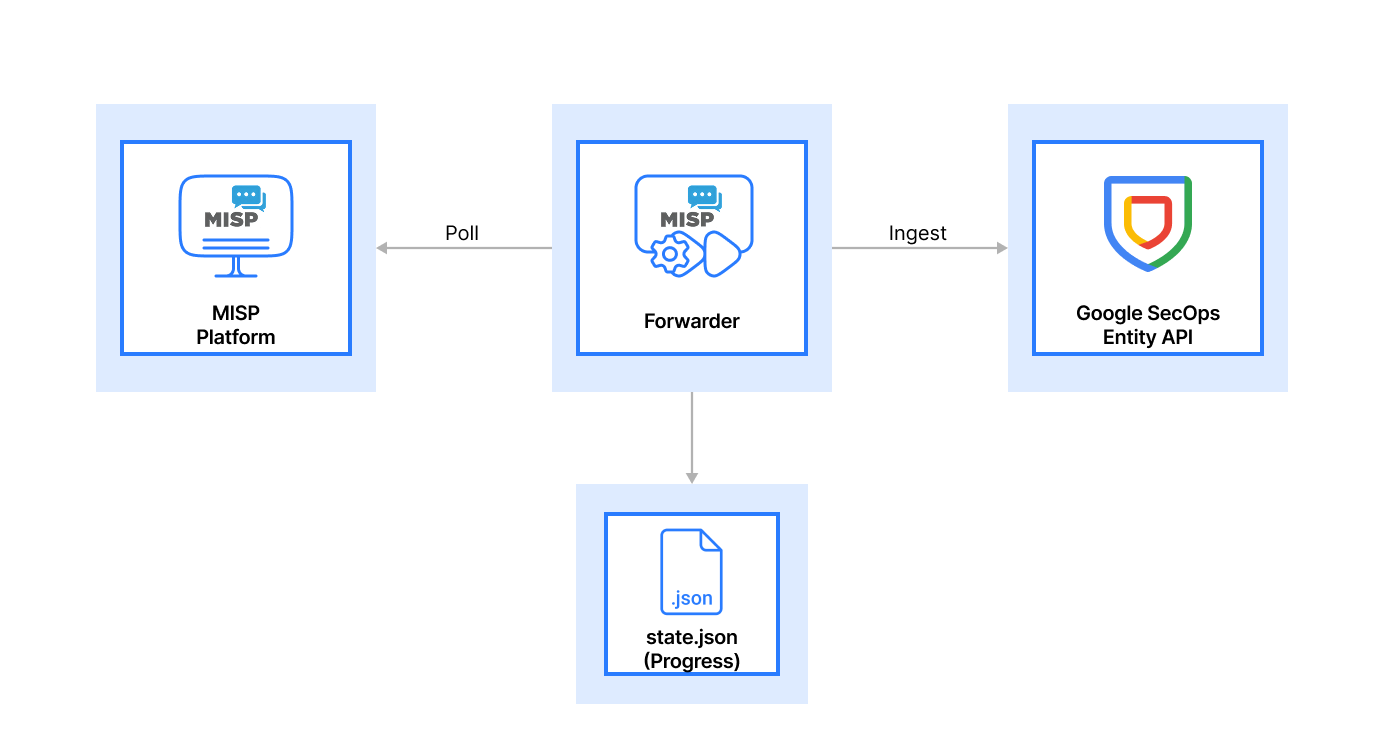
MISP acts as the upstream source of truth. Your organizations will use the REST API to expose indicators along with their metadata, including tags, timestamps, and confidence levels.
The forwarder service polls MISP at configurable intervals, retrieving only new or updated indicators. This incremental approach ensures efficiency and avoids unnecessary reprocessing.
At the same time, Google SecOps continues to ingest telemetry from across the organization. The integration ensures that intelligence and telemetry meet in the same platform.
- Normalizing and Standardizing Intelligence
Raw indicators alone are not enough. Your security teams will quickly learn that normalization is critical. The forwarder translates MISP attributes into the entity formats supported by Google SecOps. Unsupported or low-confidence indicators can be filtered out before ingestion. Metadata such as expiration windows and context are preserved where relevant.
By standardizing intelligence before ingestion, your organization can ensure there is consistent behaviour across all the detections and investigations.
- State Tracking and Process Management
One of the most important architectural decisions your teams will have to make is state persistence.
The forwarder maintains a local state file (state.json) that tracks:
- Indicators that have already been ingested.
- The last successful synchronization point.
This prevents duplicate ingestion, supports safe restarts, and allows the integration to recover cleanly from failures, an essential requirement in production environments.
- Generating an Entity-Centric View in Google SecOps
Once ingested, IoCs in your application environment become an entity context within Google SecOps. This means:
- Indicators remain active for a defined time window.
- When matches occur, alerts are generated automatically.
- Intelligence is visible and searchable during investigations by your security analysts.
At this stage, your security teams will gain a unified view where threat intelligence, telemetry, and entities intersect.
- Data Storage and Correlation at Scale
Google SecOps stores entity context alongside telemetry in its analytics backend. This allows your organization to continuously correlate across all the security logs & do advanced hunting using entity-based queries and detection rules.
This architecture supports scale without requiring your security teams to manage infrastructure or retention manually.
- Analysis and Risk Evaluation
With the combination of intelligence and telemetry, your security analysts can now prioritize alerts more effectively.
Routine matches may be handled automatically, while higher-risk indicators based on context, frequency, or asset sensitivity can trigger deeper investigation. This architecture ensures security analysts always have context about why an alert was fired.
- Reporting, Investigation, and Continuous Improvement
Your security teams will use this integrated view to investigate incidents faster, understand how and where indicators appeared, refine MISP curation based on detection outcomes, and continuously improve intelligence quality and relevance.
Over time, this feedback loop strengthens both MISP and Google SecOps usage in your organization.
Conclusion: Making Threat Intelligence Work at Scale
When your organization integrates MISP with Google SecOps, you are moving beyond passive threat intelligence and into active response.
This integration ensures that indicators from MISP are consistently ingested into Google SecOps, following the same model used by other modern Google SecOps integrations.
If you're planning a MISP–Google SecOps integration, our team at Metron Security can help design and deploy a production-grade architecture tailored to your environment.
For any queries or integration needs related to cybersecurity platforms, please feel free to reach out to us at connect@metronlabs.com