How FortiSOAR Works: Practical Use Cases for Modern Security Operations
Dive into how FortiSOAR helps your organization to better coordinate its alerts and response.
In many organizations, Fortinet tools play a prominent role in their security foundation. Firewalls enforce network controls, logs flow into centralized monitoring systems, and policies are managed at scale. On paper, the technology stack has all the components needed to elevate the organization’s security operations
In practice, however, security teams often struggle not with detection, but with response. Alerts may arrive from multiple systems, investigations often require jumping between consoles, and response actions can depend heavily on manual coordination. Ultimately, as environments grow more complex, these gaps become harder to manage consistently.
Moreover, most enterprises currently operate mixed security environments. That is to say, Fortinet platforms coexist with SIEMs, endpoint tools, threat intelligence feeds, cloud security services, and IT workflows from different vendors. Without a way to connect these systems operationally, valuable context remains scattered, and response processes vary from analyst to analyst.
This is where Security Orchestration, Automation, and Response (SOAR) becomes a highly relevant consideration.
Rather than replacing existing tools, a SOAR platform provides the glue that ties them together, standardising workflows, automating repetitive steps, and helping your teams to respond more predictably under pressure. In ecosystems relying on Fortinet tools, FortiSOAR plays this role by integrating Fortinet and non-Fortinet technologies into shared investigation and response processes.
In this post , we take a closer look at how those integrations work in real environments, which use cases tend to deliver value first, and how your organizations can use FortiSOAR to move from fragmented security operations towards a more unified and dependable response model.
Why Does Your Organization Need FortiSOAR?
As security environments grow, your organization inevitably ends up operating a wider range of firewalls, SIEMs, endpoint platforms, cloud security controls, and ticketing systems. While each tool serves a specific purposethe possible lack of coordination between them only becomes exacerbated as the playbook grows
To remedy this, FortiSOAR can be introduced as an orchestration layer that sits above existing security tools rather than alongside them. It integrates with your third-party applications through connectors and APIs, enabling it to both consume data and initiate actions across your environment.
When integrated effectively, FortiSOAR will allow your security team to:
- Collect and normalize alerts from multiple tools into a single operational view, reducing the need to switch between consoles.
- Trigger response actions based on predefined logic or security analyst approval, such as blocking indicators, isolating endpoints, or creating IT tickets.
- Track incidents end-to-end, maintaining timelines, evidence, decisions, and audit trails as part of the response process
The objective of deploying FortiSOAR is therefore not to change how your organization's security tools function, but to enhance how your security teams work across them.
By standardizing workflows and reducing manual effort, your organization can respond to incidents more consistently, scale operations more effectively, and rely less on individual expertise to keep your security operations running smoothly.
Inner Working of FortiSOAR
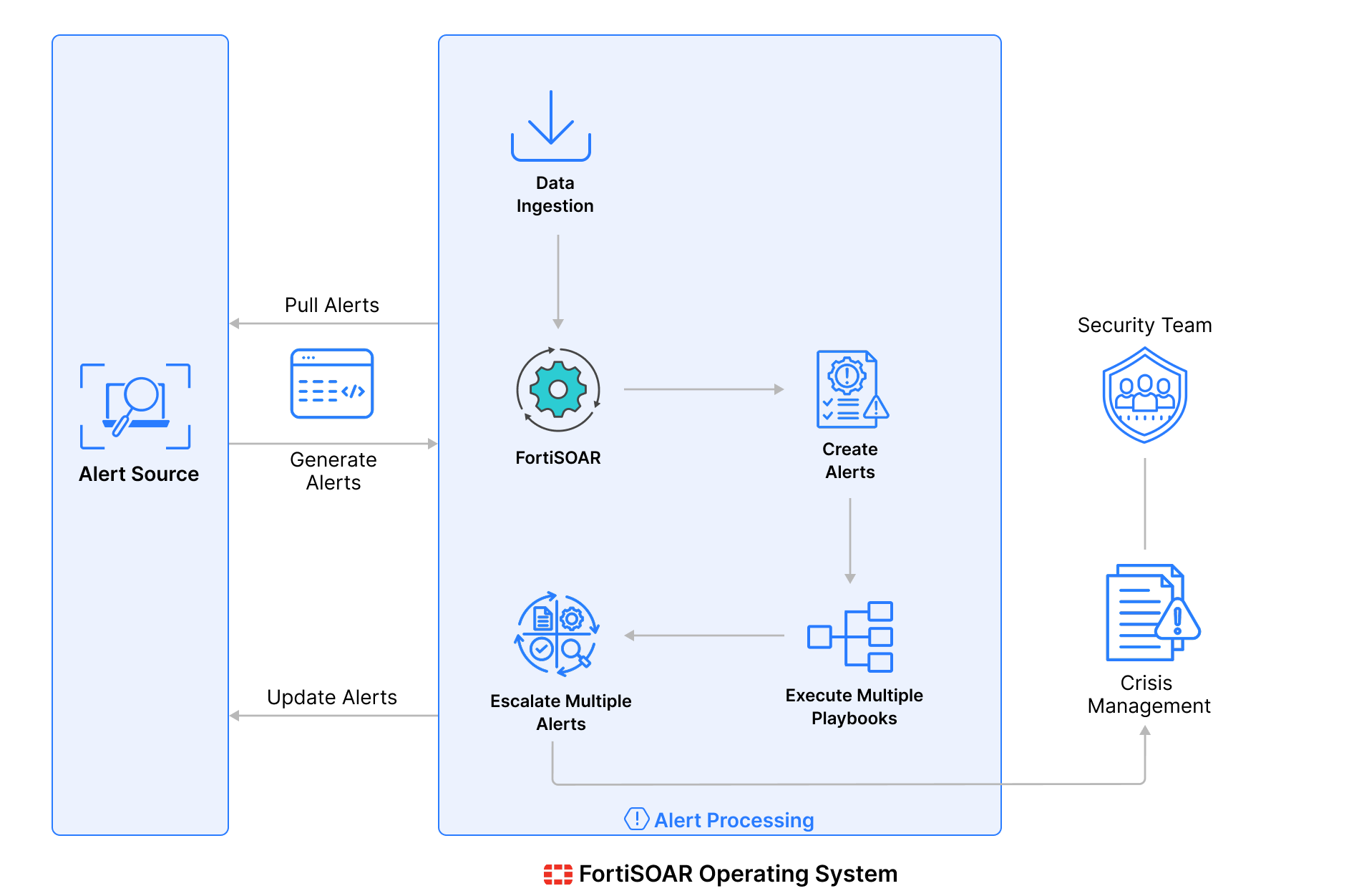
Use Cases of FortiSOAR Integration
- Correlating Fortinet Alerts Into a Single Incident View
Problem: In organizations using multiple Fortinet tools, alerts are generated independently by FortiGate, FortiEDR, FortiMail, FortiClient, and FortiSIEM. While each alert may be valid on its own, security teams often struggle to understand whether they are related or part of a larger incident.
How FortiSOAR Works: FortiSOAR can ingest alerts from across the Fortinet Security Fabric and use playbooks and event relationships to correlate related activity into a single incident. Firewall activity from FortiGate, endpoint detections from FortiEDR, and SIEM alerts from FortiSIEM are linked together, giving your security teams a consolidated view of what happened, how it progressed, and which systems are involved.
- Enriching Fortinet Alerts With Context From the Security Fabric
Problem: In most organizations, the alerts generated by Fortinet often lack the full context needed to quickly identify the impact, such as asset information, user identity, or historical behaviour. Security teams are forced to manually query multiple Fortinet consoles to gather this information.
How FortiSOAR Works: In your organization, once enrichment playbooks and integrations are configured, FortiSOAR can automatically enrich Fortinet alerts by pulling additional context from tools such as FortiAnalyzer, FortiClient, FortiSIEM, and FortiEDR.This provides your organization with details such as the affected accounts of employees, the endpoint status of users, prior activities reported by the users, and related security events, allowing for faster and more informed decision-making.
- Standardizing Response for Fortinet-Detected Threats
Problem: In most organizations, the way Fortinet alerts are handled often depends on the security teams responding to them. Similar alerts from FortiGate or FortiEDR may result in different investigation paths, which leads to inconsistent response quality.
How FortiSOAR Works: In your organization, FortiSOAR will allow your teams to create response playbooks tailored specifically to Fortinet detections. When a FortiGate intrusion alert or FortiEDR malware detection occurs, FortiSOAR guides your security analysts through a consistent set of investigation and response steps, ensuring threats detected by Fortinet tools are handled in a repeatable and reliable manner.
- Automated Containment Using Fortinet Enforcement Controls
Problem: In most organizations, many containment actions in Fortinet environments, such as blocking IPs, isolating endpoints, or updating policies, are well understood but executed manually, delaying response during active incidents.
How FortiSOAR Operates: In your organization, FortiSOAR will integrate directly with FortiGate, FortiEDR, and FortiManager to automate or semi-automate containment actions. Based on predefined criteria, FortiSOAR can block malicious indicators, isolate affected endpoints, or push policy updates, either automatically or with your security team's approval, hence reducing manual efforts.
- End-to-End Incident Tracking
Problem: In most organizations that use multiple Fortinet tools, incident details are often spread across different systems, making it difficult to maintain a clear timeline of actions, decisions, and outcomes.
How FortiSOAR Operates: In your organization, FortiSOAR will act as a central system of record for incidents originating from Fortinet detections. Alerts, evidence, investigation steps, response actions, and outcomes are tracked in a single case, supporting collaboration, reporting, and post-incident analysis.
Conclusion
By integrating FortiSOAR with existing security tools and establishing shared workflows, your organization can bring more structure to how incidents are handled. Alerts become easier to interpret, investigations follow a consistent path, routine actions are completed faster, and all activity is tracked in a single place. The underlying tools remain the same; what improves is how your security teams work with them.
In the end, strengthening security operations with FortiSOAR isn’t about automation for its own sake. It’s about giving your security teams a clearer process, reducing unnecessary effort, and helping them respond with confidence as the environment continues to evolve.
Is your organization looking to set up any integrations with Fortinet or having trouble connecting security apps with its infrastructure? For any queries or integration needs related to cybersecurity platforms, please feel free to reach out to us at connect@metronlabs.com.