Turning Identity Attack Path Findings into Action with Silverfort
Discover how attack path findings become Silverfort controls.
Service accounts are non-human identities that applications use to run routine tasks, such as scheduled jobs or data transfers between systems. They are very common and frequently necessary. The risk here, however, is that their permissions tend to accumulate over time. For instance, an account that only needs to run a backup job may also have access that gives an attacker a path to a critical server.
Identity attack path analysis tools find these routes and show which accounts and systems are involved. But finding a path is only half the work. Someone still has to locate the same account in the tool that enforces access, such as Silverfort, and decide what protection to apply. Today, that often means matching accounts and updating policies by hand across two separate tools.
Integrating Silverfort with an identity attack path analysis platform connects these steps. Silverfort’s inventory adds context about service accounts and other non-human identities to the analysis. In return, attack path findings guide configured risk updates, policy changes, and account protection in Silverfort.
The following post details the integration’s workflow, from deployment and identity mapping to processing findings, applying controls, and tracking actions.
Integration Architecture and Workflow
This integration runs as a containerized application within the customer’s environment, with network access to Silverfort and the identity attack path analysis platform. The middleware exchanges information between the platforms and translates findings into configured Silverfort actions.
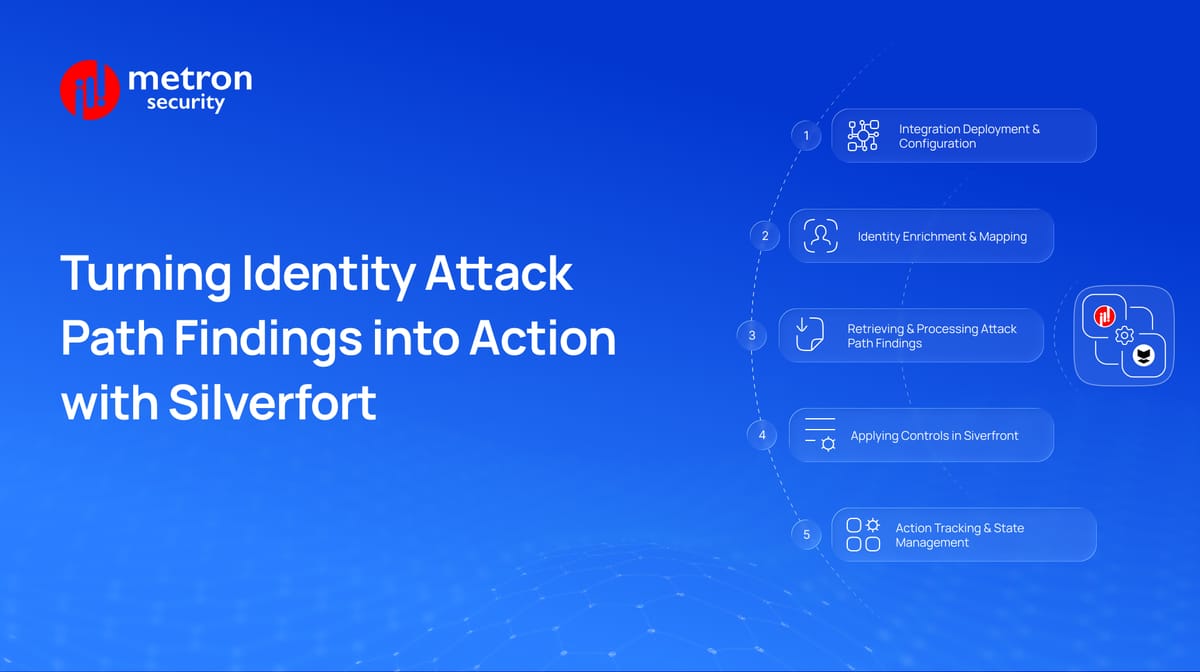
The diagram shows five steps, from initial configuration to action tracking. Identity enrichment runs independently, while finding retrieval, enforcement, and tracking form the response workflow.
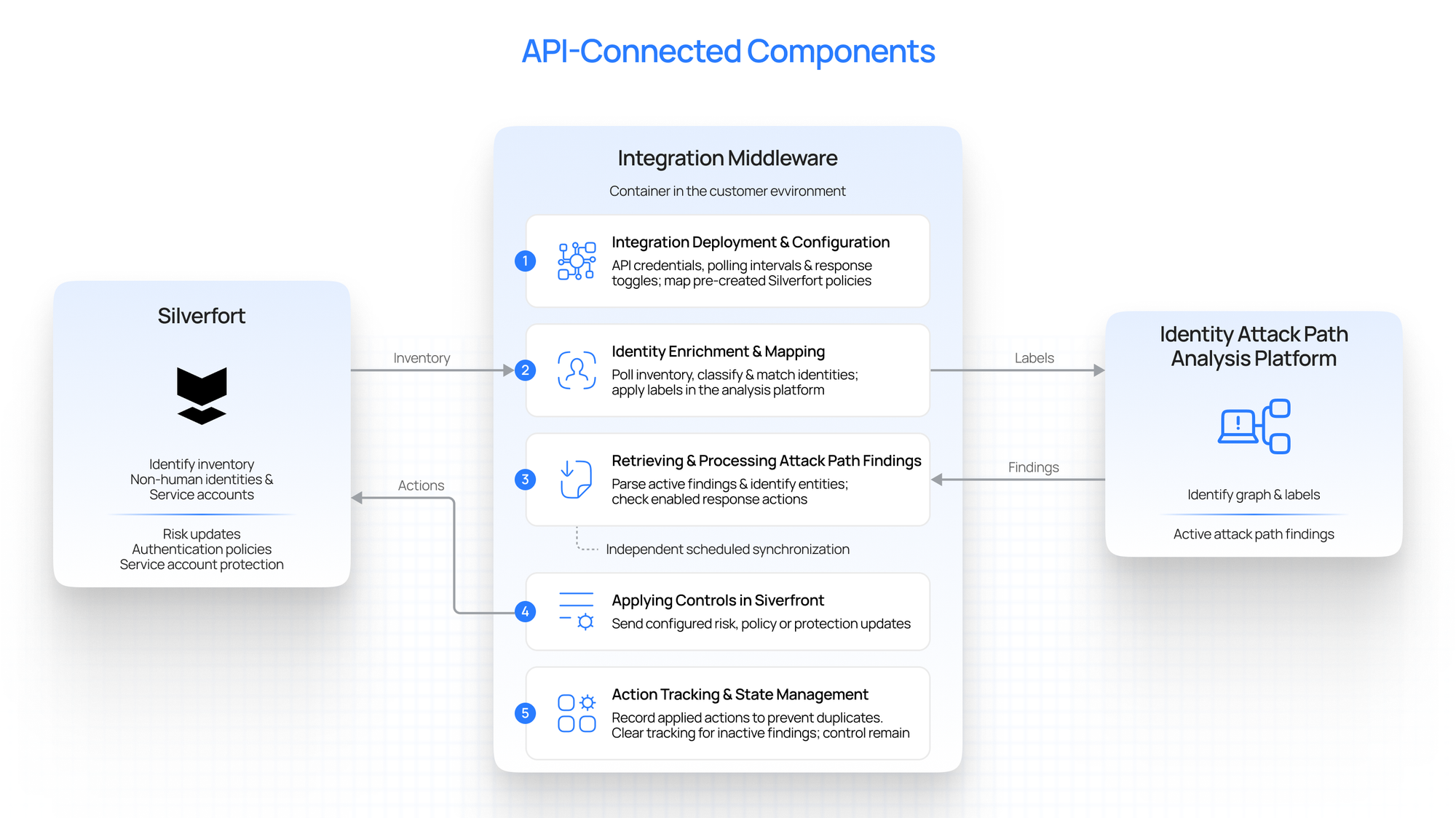
The following sections explain each step, from deployment and configuration to applying and tracking controls in Silverfort.
Integration Deployment and Configuration
An administrator configures the middleware with the settings needed to connect both platforms and define its permitted actions:
- API credentials and connection details: Allow the middleware to retrieve identity information, read findings, and send Silverfort API requests.
- Polling intervals: Determine how frequently the integration checks for updates.
- Response capabilities: Enable the specific actions the integration is allowed to perform.
- Policy mappings: Identify the pre-created Silverfort authentication policies to update when a finding references a relevant user, group, or destination asset.
The existing Silverfort policy configuration determines the enforcement applied when its coverage changes. Once configured, the middleware begins its scheduled background operations.
Identity Enrichment and Mapping
The middleware runs an independent synchronization process to bring Silverfort’s identity context into the attack path analysis platform:
- Retrieve inventory: Periodically query Silverfort for non-human identities and service accounts.
- Label retrieved identities: Use all non-human identity entries returned by Silverfort’s API for mapping and labeling in the attack path analysis platform
- Match accounts: Map the discovered accounts to their corresponding identities in the attack path platform.
- Apply labels: Add classification labels, such as non-human identity or AI, to the matched entities through the platform’s API.
These labels help security teams recognize the type of identity involved when reviewing an attack path. This process enriches the analysis; protection actions are handled separately through the findings-response workflow.
Retrieving and Processing Attack Path Findings
At each configured polling interval, the middleware retrieves active findings from the identity attack path analysis platform and processes them to determine the appropriate response:
- Extract relevant entities: Identify the source user or group, destination computer or critical asset, and identity types referenced in the finding.
- Resolve service accounts: Check whether a finding’s principal matches a service account in Silverfort’s inventory.
- Determine the action: Use the finding’s details to select the corresponding risk update, policy change, or service account protection action.
- Check enabled capabilities: Confirm that the administrator has enabled the relevant response before sending an action request.
This stage connects the entities identified in a finding to the configured Silverfort response. The next step applies that action through Silverfort’s API.
Applying Controls in Silverfort
After processing a finding, the middleware sends the corresponding API request to Silverfort. The scope defines four supported actions, each addressing a different part of the identified exposure.
- Shadow admin risk updates: When a finding identifies a user with dangerous privileged access, the integration raises that entity’s risk level in Silverfort. This updates the risk associated with the account; it does not directly disable it.
- Choke point mitigation: When a finding identifies a source user or group, the integration adds that identity to a designated Silverfort authentication policy. This brings the identified account or group within the policy’s coverage.
- Tier 0 protection: When a finding identifies a destination computer or critical asset, the integration adds that target to a designated authentication policy. This applies the configured policy to the destination involved in the attack path.
- Service account protection: When the finding’s principal matches a service account in Silverfort’s inventory, the integration enables protection for that account.
The resulting enforcement depends on the selected action and the existing Silverfort configuration. Policy updates therefore follow the administrator’s mappings, rather than creating a new policy for every finding.
Action Tracking and State Management
The same finding may remain active across several polling cycles. The middleware maintains local records of applied actions to manage this:
- Prevent duplicate operations: Track actions already applied so subsequent checks do not repeatedly trigger the same operation.
- Clear inactive findings: Remove the local tracking entry when a finding no longer appears in the active set.
- Retain Silverfort controls: Leave previously applied risk updates, policy changes, and service account protection in place after clearing the tracking entry.
A finding’s disappearance therefore does not automatically reverse its associated controls. Teams need a review process to determine whether those controls are still required and when they should be removed.
Conclusion
This integration connects identity attack path findings with configured actions in Silverfort. Silverfort’s inventory first adds context about non-human identities to the analysis platform. The middleware then retrieves active findings, identifies the accounts and assets involved, and applies the enabled risk or protection actions.
The workflow depends on accurate identity matching, clear policy mappings, and action tracking. These details determine whether a finding leads to the intended control on the correct account or system. Teams also need a review process for applied controls, since those controls remain in place after a finding disappears.
Building an integration between your identity security platform and Silverfort? Metron Security helps design, develop, and validate identity mapping, policy updates, and response workflows. Share your platforms and integration requirements at connect@metronlabs.com to discuss your use case.